
How do I turn off Windows 10 & 11 automatic updates?
author: VENOEN
2023-11-27
- Overview:
Windows 11 and 10 offer less UI control over the operating system's update behavior than previous versions of Windows. In Windows 11 & 10, there is no option to turn off Windows Updates using the Control Panel or Settings app, it automatically checks for updates and installs any they find, whether you like it or not. This new feature is actually very convenient for most users. If you want to control the update process, you can disable the Windows update service. This requires opening the service manager, finding the service and changing its startup parameters and status. Then, every time you want the operating system to check for updates, you have to enable the service again (which doesn't seem so easy). - Windows Update Blocker is a free software that helps you completely disable or enable automatic updates on your Windows system with the click of a button. The utility is portable, which means you no longer need to go through the installation process and there will be no leftover stuff left on the HDD after removing it. If you put the program files on an external data device, you can take Windows Update Blocker with you and use it on any computer you come across that is well configured and don't want to risk an update that might break them system. This utility is for that person.
- 1.Windows Update Blocker download address:Downloading Windows Update Blocker 1.8 from FileHorse.com

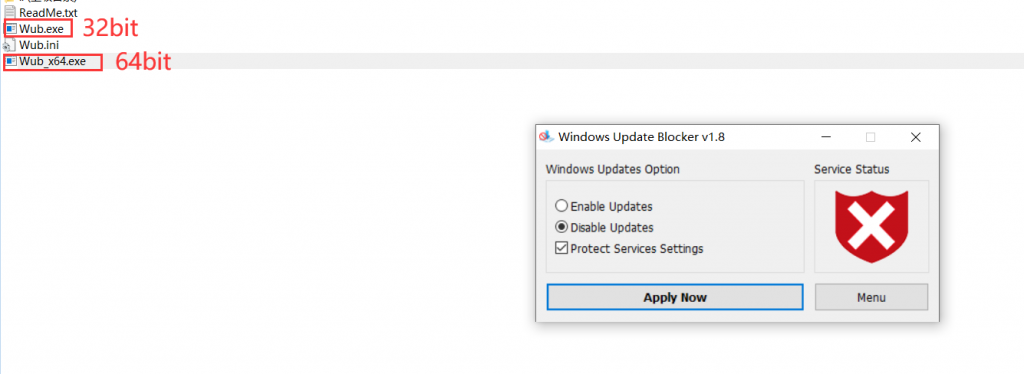
- 2、After downloading, unzip it and run the corresponding exe file according to your operating system version. For 32-bit systems, select Wub.exe. For 64-bit systems, select Wub_X64.exe and double-click to run.
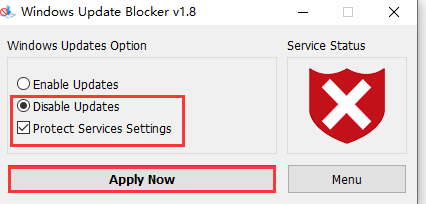
- 3. After entering "Windows Update Blocker", check "Disable Updates", "Protect Services Settings" in turn, and select "Apply Now".
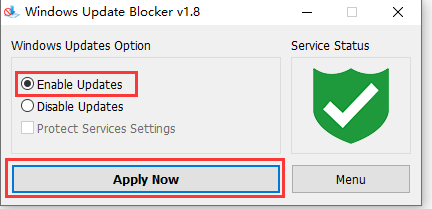
- 4. If you need to start the update function, you can run "Windows Update Blocker" again, check Enable Updates, and select "Apply Now" to start the update function.
How to switch between RS485\RS422 for K4-4th Gen models?
How does H6 switch between RS422/RS485 modes?
