
How to enable Auto power on an industrial tablet?
author: VENOEN
2025-07-18
How to enable the industrial control tablet to start automatically after power-on?
Overview:
Self-starting after power-on means that after the computer is powered on, the system will automatically start and automatically run pre-programs. Auto-start when the industrial control tablet is powered on is a setting that means that when the industrial control tablet is powered on, it will automatically start up and start running. This setup is commonly used in automation systems and remote monitoring systems in industrial environments.
For the entire series of industrial control tablets, the chassis panel is designed with an AT/ATX gear. With this gear, you can easily turn on or off the power-on self-start function.
Self-starting after power-on means that after the computer is powered on, the system will automatically start and automatically run pre-programs. Auto-start when the industrial control tablet is powered on is a setting that means that when the industrial control tablet is powered on, it will automatically start up and start running. This setup is commonly used in automation systems and remote monitoring systems in industrial environments.
For the entire series of industrial control tablets, the chassis panel is designed with an AT/ATX gear. With this gear, you can easily turn on or off the power-on self-start function.
Step 1. Turn on power-on auto-start
When the power is off, adjust the "AT/ATX" gear on the chassis to the "AT" gear, and it can be turned on successfully. After adjusting to this gear, the system will automatically start and run the pre-program when the computer is powered on, which is suitable for use in unattended or 24-hour computer operation environments.
When the power is off, adjust the "AT/ATX" gear on the chassis to the "AT" gear, and it can be turned on successfully. After adjusting to this gear, the system will automatically start and run the pre-program when the computer is powered on, which is suitable for use in unattended or 24-hour computer operation environments.
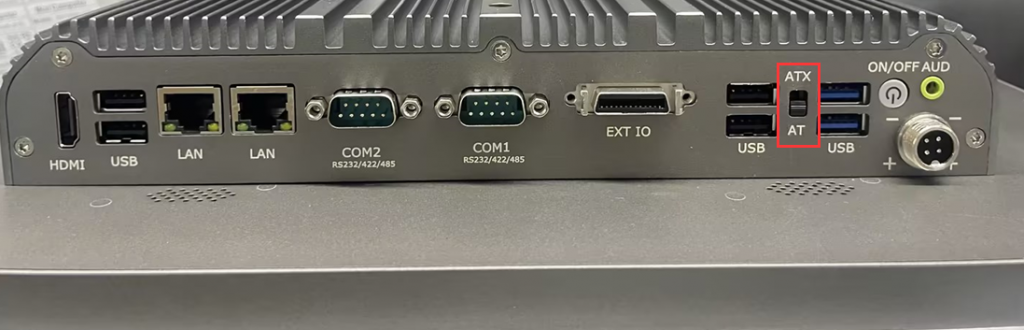
- Step 2: Turn off auto-start after power-on
When the power is off, adjust the "AT/ATX" gear on the chassis to the "ATX" gear to turn off the power-on auto-start function.
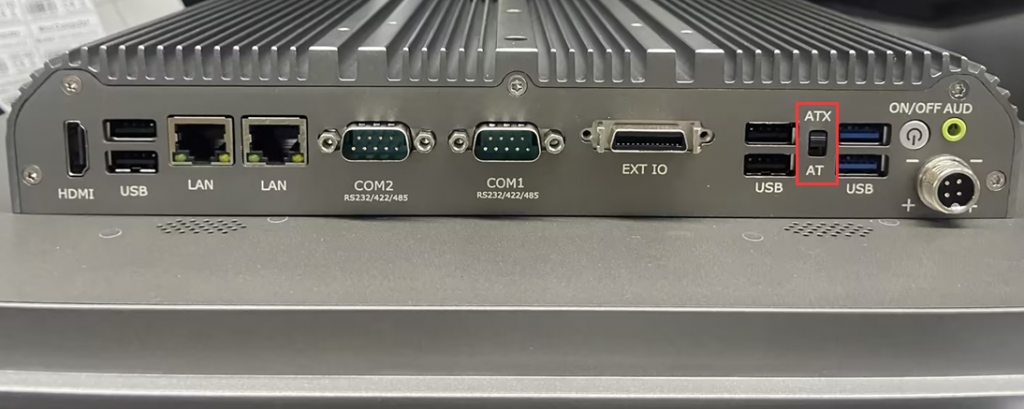
F9-11 th Gen Configuration Auto Power on Steps
P09-6L Auto Power On
Related Article
