
"P01GM" How to configure the power-on auto-start procedure?
author: VENOEN
2025-10-11
- step 1:
PS: Please confirm that the keyboard is connected. It is recommended to use a wired keyboard to enter the BIOS Setup. A Bluetooth keyboard cannot enter the BIOS.
Press the switch button and quickly tap the F2 key on the keyboard to enter BIOS Setup. After entering the BIOS, select Chipset>PCH -IO Configuration>Configure State After G3 to S0 state.
State After G3 can be configured as S0 state or S5 state;
S0 state: Automatically boot after power on
S5 state: Press the power button to boot normally
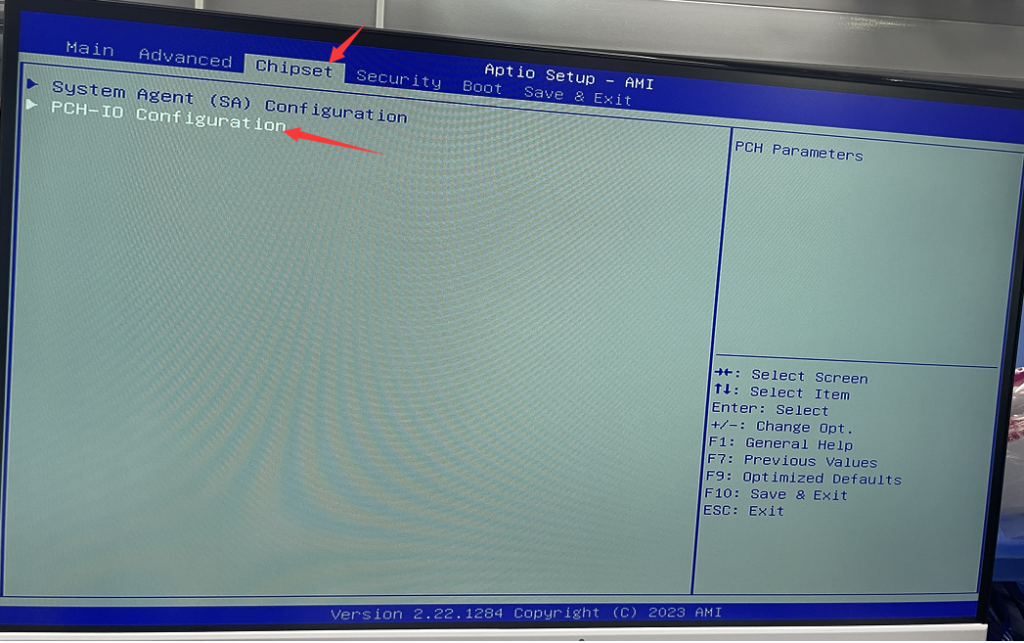

- Step 2:
After the configuration is completed, press the F10 key on the keyboard to save and exit. Later, when the computer is powered on, it will automatically boot.
<P04-8th Gen>How to enable Auto Power on?
M3-12\13 th Gen configuration power-on auto-start steps
Related Article
