
P12B-How to set Auto Power on +1 Key restore CMOS
author: VENOEN
2023-12-05
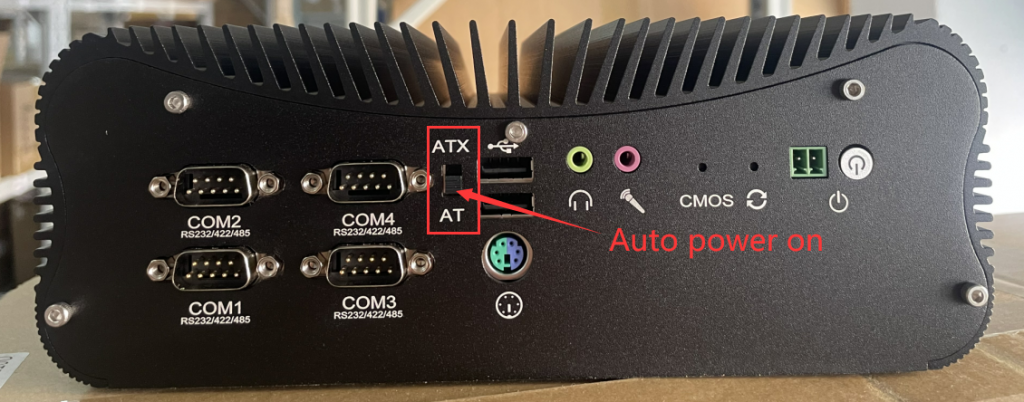
- 1. The ATX/AT gear is designed on the entire P12B series panel. This gear is used to turn on or off Auto Power on. The default state is ATX file, and ATX file is closed. If you need to turn on the Auto Power on function, just adjust to the AT position. As shown below
- 2. In daily use, the computer may have no response after pressing the switch button and cannot be turned on normally. When this kind of failure occurs, please follow the following steps to troubleshoot:
a. Please check whether the power adapter is powered on and whether the adapter supplies power normally.
b. Remove all external devices (such as keyboard, mouse, mobile hard disk, U disk, USB HUB, etc.) and then start the test
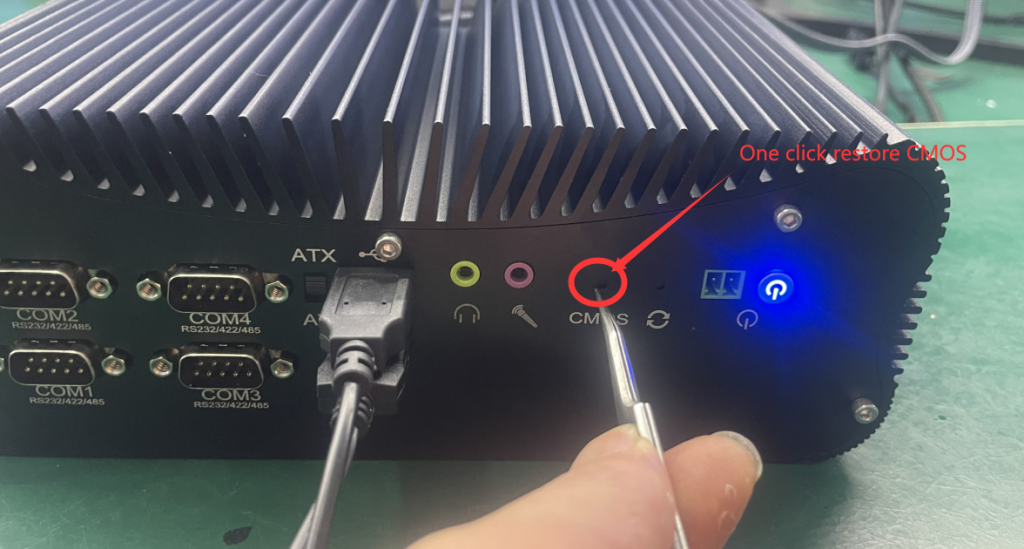
c. A 1-key CMOS recovery button is designed on the entire P12B series panel, which can be used to restore CMOS parameters. In most cases, no response when pressing the switch button is related to CMOS parameter errors. Recovery method: Connect the power adapter and make sure the computer is powered on. Use sharp tools such as pliers and mobile phone pins to insert the CMOS recovery button for 5-10 seconds. When the switch indicator light flashes, the recovery is successful.
M3-12\13 th Gen configuration power-on auto-start steps
M5-How to set Auto Power On
Related Article
