
What is the difference between laptop DDR3L, DDR4, and DDR5?
author: VENOEN
2025-09-16
(What are the differences between notebook DDR3L, DDR4 and DDR5?)
Overview:
Mini computers have a wide range of applications and a wide range of products. The product line includes DDR3L, DDR4, and DDR5. Let’s introduce the differences between these memory modules.
Mini computers have a wide range of applications and a wide range of products. The product line includes DDR3L, DDR4, and DDR5. Let’s introduce the differences between these memory modules.
1. Appearance difference
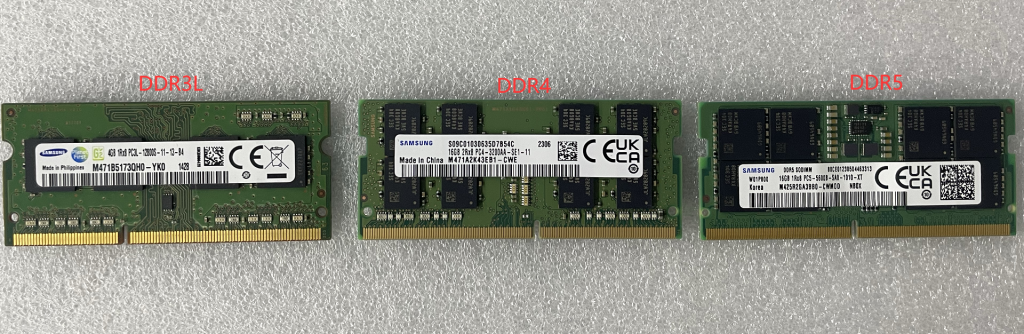
In order to avoid damage to the machine caused by user errors, the memory module has a "fool-proof design". Memory module slots of different generations are different. For example, DDR3L memory modules cannot be inserted into DDR4 memory slots. The picture below shows the appearance of DDR3L, DDR4, and DDR5 memory modules:
In order to avoid damage to the machine caused by user errors, the memory module has a "fool-proof design". Memory module slots of different generations are different. For example, DDR3L memory modules cannot be inserted into DDR4 memory slots. The picture below shows the appearance of DDR3L, DDR4, and DDR5 memory modules:

- 2. Memory frequency difference
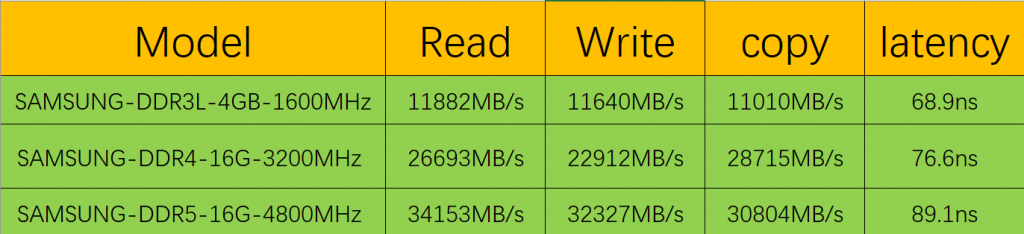
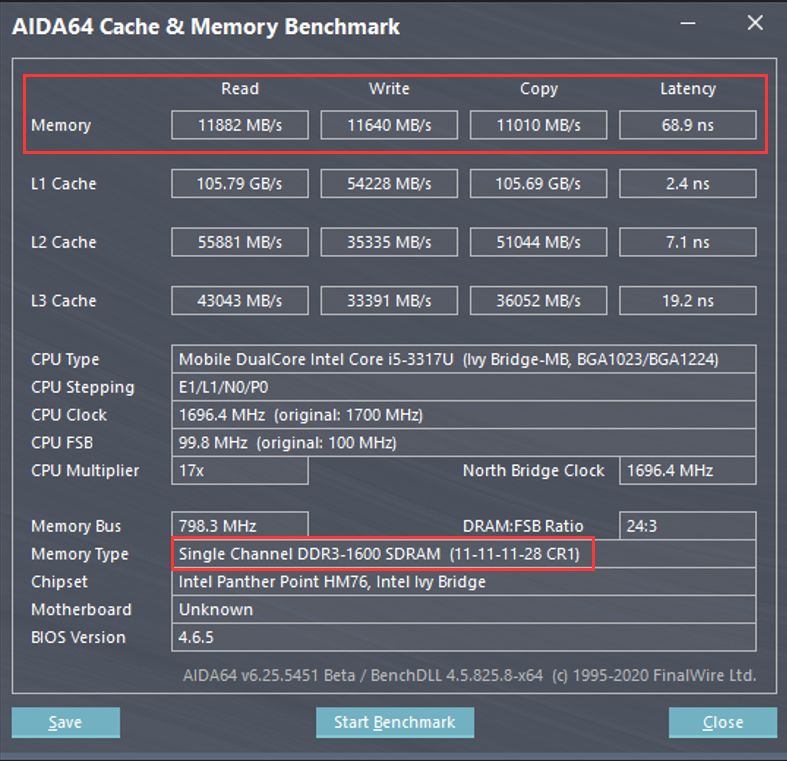
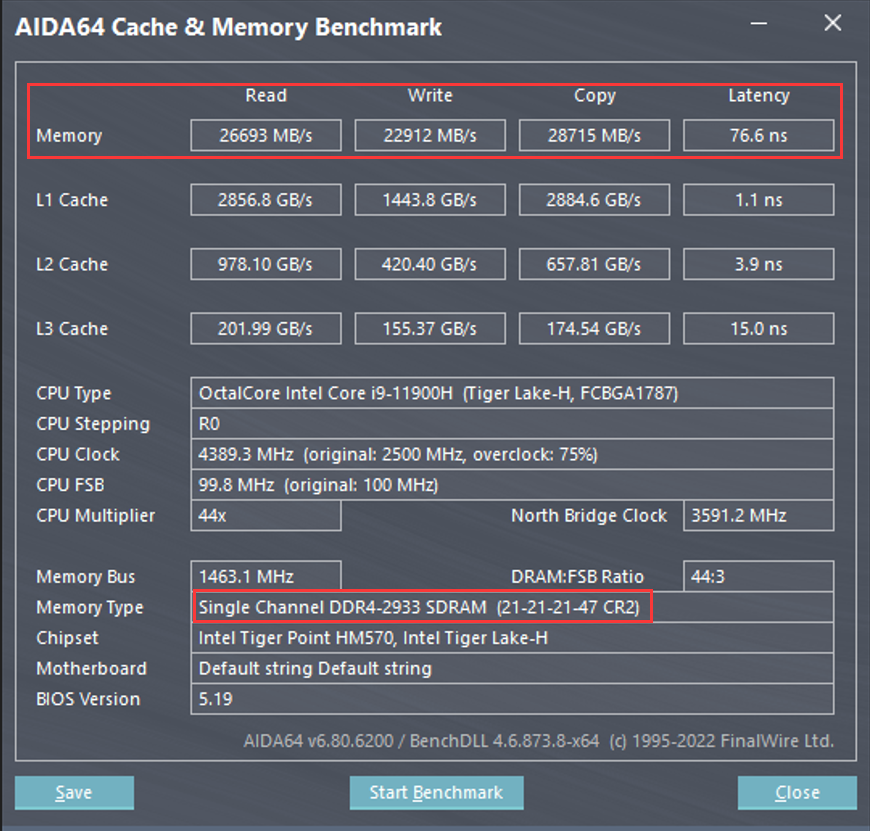
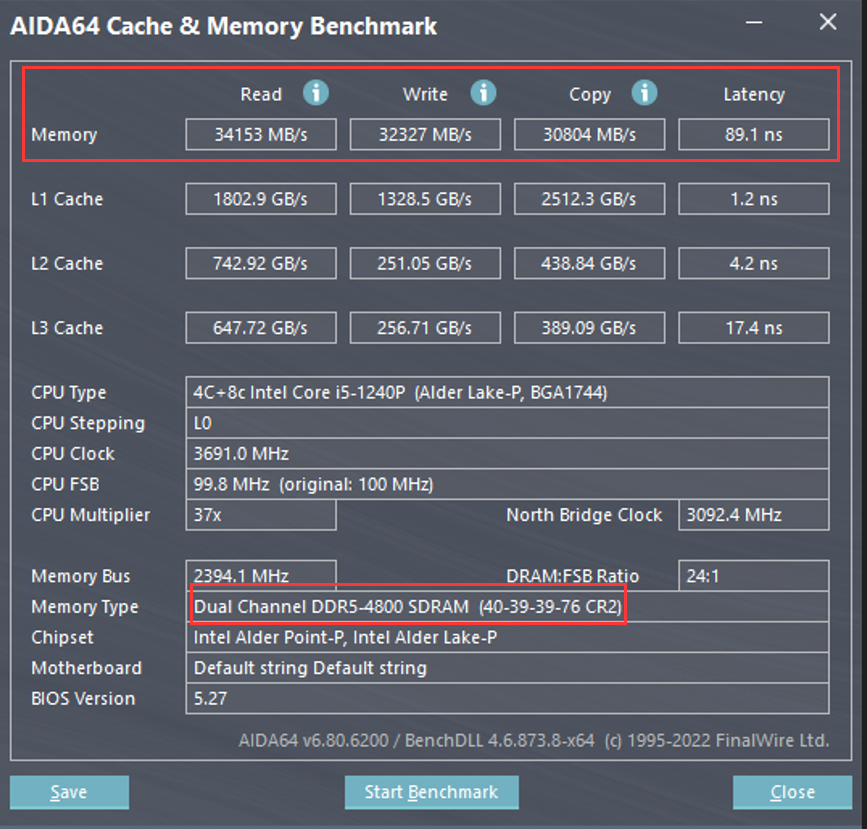
DDR5 has a higher basic frequency, starting at 4800MHz, while DDR4 generally only has 2133MHz, 2400MHz or 3200MHz, and DDR3L starts at 1333MHz or 1600MHz. Generally, the higher the memory frequency, the faster the reading and writing speed, and the stronger the computer performance. However, the higher the memory frequency and the larger the memory capacity, the higher the memory delay will be. When the delay is high, it will increase the computer's power-on self-test time. Usually, when the delay does not exceed 100ns, it is normal. We used AIDA64 CACHE & Mamory Benchmark to test the Read, Write, copy and latency performance of DDR3L, DDR4 and DDR5 memory respectively, for reference. PS: The test data is laboratory data. The test data is for reference only. Different configurations and test environments are different, and the test data may be different!
From the data in the list, it can be concluded that DDR5 has a comprehensive improvement of 27.9% compared to DDR4, and DDR5 has a comprehensive improvement of 187% compared to DDR3L.
- 3. Differences in working voltage
The working voltage of DDR3L is 1.35V, the working voltage of DDR4 is 1.2V, and the working voltage of DDR5 drops to 1.1V. The advantage is that the energy consumption ratio is better.
- 4. Differences between PMIC power management chips
DDR3L does not have PMIC power management chip
DDR4 has a PMIC power management chip, which is just integrated on the motherboard.
DDR5 has integrated the PMIC power management chip from the motherboard to the memory PCB board. The advantage is that it can intelligently adjust voltage changes, monitor current while promoting the configurability of voltage slopes and levels, and reduce the burden of motherboard power management. Compared with integrating on the motherboard, integrating on the memory has a shorter path and faster control speed.
- 5. Differences in memory capacity
The factory maximum capacity of a single DDR3L is 8G. There may be larger capacities on the market. If the capacity exceeds 8G, it may not be compatible with our mini computers.
The maximum capacity of a single DDR4 factory is 32G. There may be larger capacity on the market. If it exceeds 32G, it may not be compatible with our mini computer.
The maximum capacity of a single DDR5 is 64G (currently not in stock at the factory). There may be larger capacities on the market. If the capacity exceeds 32G, it may not be compatible with our mini computers.
- 6. Differences in bandwidth speed
DDR3L -1600MHz has a bandwidth of 12.8GBps.
DDR4 3200MHz has a bandwidth of 25.6GBps.
DDR5 4800MHz has a bandwidth of 38.4GBps
PS: As the frequency increases, the bandwidth also becomes higher. If dual channels are established, the bandwidth will theoretically be doubled. - 7. Integrated ECC memory error correction mechanism
DDR3L and DDR4 do not have ECC memory error correction function.
DDR5 adds a simplified version of the ECC error correction function. Only the On-die Ecc error correction function is added to DDR5. On-die Ecc can only correct errors inside the memory. As for Ecc, which is often called, there are usually extra particles allocated to Ecc. function to correct communication errors during operation. The ECC on DDR5 is mainly to improve the stability of the memory, such as reducing the probability of blue screen occurrence, but there is still a certain gap between it and server-level memory.
PS: The ECC error correction function is not standard. Only memory models that support the ECC error correction mechanism can support this function.
- 8. Difference in number of pins (laptop memory stick)
The pin count of DDR3L is 204-Pin, the pin count of DDR4 is 260-Pin, and the pin count of DDR5 is 262-Pin.
- 9. Timing difference (CL)
The lower the timing, the better. The timing of DDR5 4800 is generally CL40, the timing of DDR4 3200 can reach CL21, and the timing of DDR3L 1600 can reach CL11. Of course, with subsequent optimization, lower timing DDR5 memory will also appear.
Summarize:
DDR5 is a big step forward compared to DDR4 and DDR3L, especially in frequency and bandwidth. Technologies such as ECC error correction and PMIC power management chips have also been added. However, DDR5 still has some imperfect shortcomings: on the one hand, Intel's CPU has just begun to support it and has not yet fully adapted to the high frequency of DDR5. The actual performance is not significantly different from DDR4 memory; at present, DDR5 is still in its early stages and there are timing issues. High, the disadvantage of high latency.
In actual performance, DDR5 has certain improvements in its support for CPU multi-threading. If you often use multiple cores in daily use, you can try to choose DDR5 memory;
DDR5 has very little improvement for independent graphics models, especially has almost no impact on large-scale stand-alone games, and slightly improves online games. If you only play stand-alone games, it is recommended to buy DDR4 memory;
Because its frequency is very high, if it is a pure nuclear display machine (such as a mini computer), the performance will be qualitatively improved. Interested friends can buy our mini computer for actual testing;
DDR5 has very little improvement for independent graphics models, especially has almost no impact on large-scale stand-alone games, and slightly improves online games. If you only play stand-alone games, it is recommended to buy DDR4 memory;
Because its frequency is very high, if it is a pure nuclear display machine (such as a mini computer), the performance will be qualitatively improved. Interested friends can buy our mini computer for actual testing;
Prompt when booting with USB flash drive: Invalid signature detected. Please check the security startup policy in the installation solution
How to install the Lubuntu operating system?
