
【M9】Steps to query the hard disk in BIOS
author: VENOEN
2025-06-10
[M9] Procedure for querying disks in the BIOS
Step 1:
Press the SW button to start the system. When LOGO is started, press the Del key on the keyboard to enter BIOS Setup.
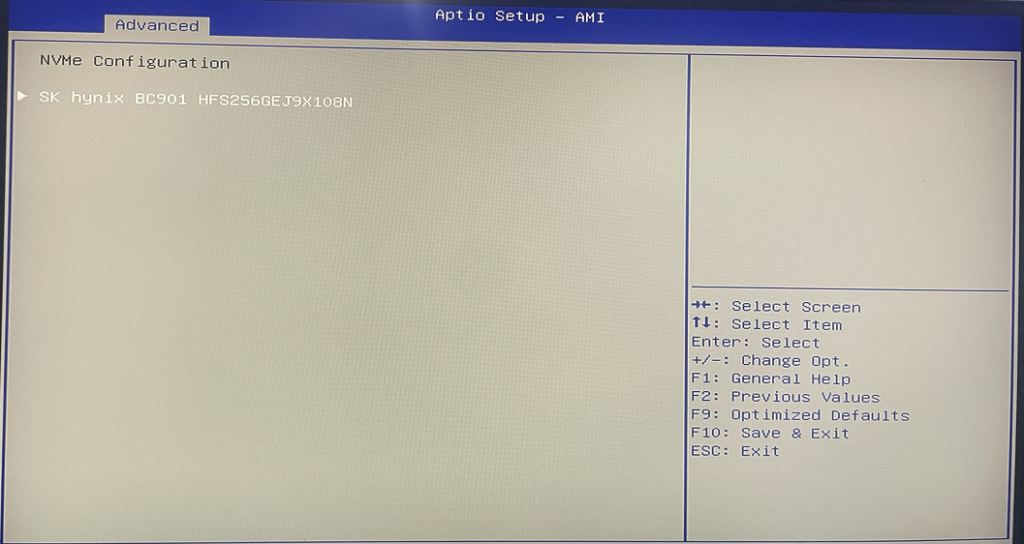
Step 2. (For NVME SSDS) After entering the BIOS, choose Advanced>NVME Configuration> In normal cases, you can view the NVME SSD easy and name.
Press the SW button to start the system. When LOGO is started, press the Del key on the keyboard to enter BIOS Setup.
Step 2. (For NVME SSDS) After entering the BIOS, choose Advanced>NVME Configuration> In normal cases, you can view the NVME SSD easy and name.

- Step 3. (Applicable to M.2 SATA SSD or 2.5-inch SSD or HDD). After entering the BIOS, choose Chipset>PCH-IO Configuration>SATA Configuration

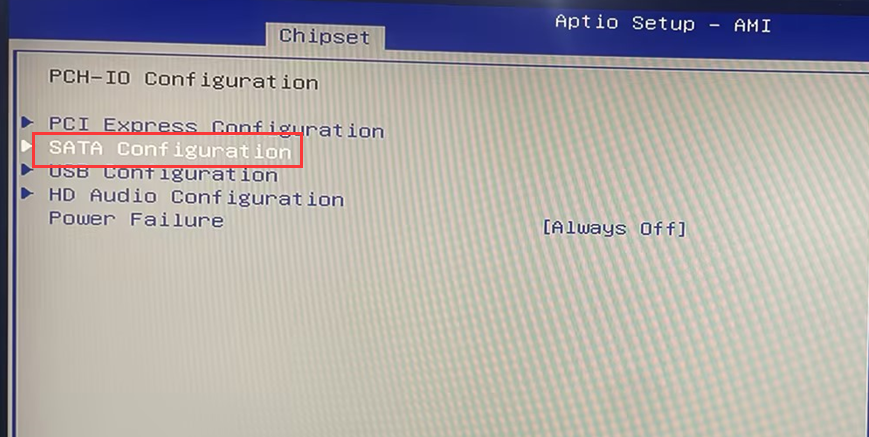
- M.2 SATA SSD Query information in Serial ATA Port 0

- The 2.5-inch hard disk is queried in Serial ATA Port 1
Steps to enable Secure Boot in BIOS
[K4-8th]Switch RS485 working mode
