
HBCD_PE_x64 maintenance tool production and usage
author: VENOEN
2025-08-01
Tool overview
Hiren's BootCD PE (Preinstallation Environment) is a lightweight Windows environment designed to help users troubleshoot and fix problems when the system fails to boot. It integrates a large number of free and open source tools and can be booted from USB or CD without having to install on a hard drive. This makes it a powerful tool for repairing crashed operating systems, diagnosing hardware problems, recovering data, and more.
Hiren's BootCD PE (Preinstallation Environment) is a lightweight Windows environment designed to help users troubleshoot and fix problems when the system fails to boot. It integrates a large number of free and open source tools and can be booted from USB or CD without having to install on a hard drive. This makes it a powerful tool for repairing crashed operating systems, diagnosing hardware problems, recovering data, and more.
Main features:
Based on Windows 10 PE, it provides the familiar Windows graphical interface.
Support for modern hardware and file systems such as NTFS, FAT32, etc.
It integrates various tools to diagnose hardware problems, perform data recovery, hard disk cloning, partition management, password reset, and more.
Common function
System diagnosis and repair
Hardware diagnosis tool: Detects and diagnoses hardware problems such as CPU, memory, and hard disks.
Disk repair tools: Include disk repair, bad sector detection, and file system repair tools, such as CheckDisk GUI and Victoria.
Data recovery
Data recovery tool: Used to recover accidentally deleted or formatted files, such as Recuva, PhotoRec, etc.
File browsing and copying tool: You can browse disks and copy files to external storage devices through the built-in file manager.
Disk cloning and partition management
Partitioning tools, such as AOMEI Partition Assistant and MiniTool Partition Wizard, support creating, resizing, merging, deleting, and formatting partitions.
Disk cloning tools such as Macrium Reflect and Clonezilla are used to back up and clone entire hard disks or partitions, often for data migration or system recovery.
Password reset and management
Password Reset Tool: You can use NT Password Edit to reset Windows login passwords and help users regain access to the system.
Password Management Tool: Integrates tools like Lazesoft Password Recovery for recovering or resetting passwords of local accounts.
Network tool
Network Diagnostics and Recovery: Hiren's BootCD PE comes with built-in network tools such as IP configuration, network status viewer, and tools for fixing network connection problems.
Remote control: Remote support and maintenance is available through the built-in remote desktop tool, such as TeamViewer.
Antivirus and anti-malware software
Anti-virus tools: Built-in lightweight virus detection software, such as Malwarebytes Anti-Malware, to help remove malware from your system.
Protection and Repair tools: Also includes tools to fix system problems caused by malware.
Backup and restore
Backup tools such as AOMEI Backupper and Macrium Reflect support full backup and restore of systems and data.
Restore tool: Used to restore data and systems from backups.
Common usage scenarios
Data recovery after a system crash: When the system fails to boot, use Hiren's BootCD PE to access the hard disk and recover important data.
Hard Disk Partitioning and Cloning: Use the disk cloning tool to seamlessly migrate data during hard disk upgrades or backups.
Password reset: If you forget your system login password, use the reset tool to restore access.
Hardware diagnostics: When a hardware failure is suspected, this tool can be used for in-depth diagnosis and testing.
Hiren's BootCD PE is a versatile tool for maintaining and repairing computers, especially for emergency recovery in case of system failure.
Support for modern hardware and file systems such as NTFS, FAT32, etc.
It integrates various tools to diagnose hardware problems, perform data recovery, hard disk cloning, partition management, password reset, and more.
Common function
System diagnosis and repair
Hardware diagnosis tool: Detects and diagnoses hardware problems such as CPU, memory, and hard disks.
Disk repair tools: Include disk repair, bad sector detection, and file system repair tools, such as CheckDisk GUI and Victoria.
Data recovery
Data recovery tool: Used to recover accidentally deleted or formatted files, such as Recuva, PhotoRec, etc.
File browsing and copying tool: You can browse disks and copy files to external storage devices through the built-in file manager.
Disk cloning and partition management
Partitioning tools, such as AOMEI Partition Assistant and MiniTool Partition Wizard, support creating, resizing, merging, deleting, and formatting partitions.
Disk cloning tools such as Macrium Reflect and Clonezilla are used to back up and clone entire hard disks or partitions, often for data migration or system recovery.
Password reset and management
Password Reset Tool: You can use NT Password Edit to reset Windows login passwords and help users regain access to the system.
Password Management Tool: Integrates tools like Lazesoft Password Recovery for recovering or resetting passwords of local accounts.
Network tool
Network Diagnostics and Recovery: Hiren's BootCD PE comes with built-in network tools such as IP configuration, network status viewer, and tools for fixing network connection problems.
Remote control: Remote support and maintenance is available through the built-in remote desktop tool, such as TeamViewer.
Antivirus and anti-malware software
Anti-virus tools: Built-in lightweight virus detection software, such as Malwarebytes Anti-Malware, to help remove malware from your system.
Protection and Repair tools: Also includes tools to fix system problems caused by malware.
Backup and restore
Backup tools such as AOMEI Backupper and Macrium Reflect support full backup and restore of systems and data.
Restore tool: Used to restore data and systems from backups.
Common usage scenarios
Data recovery after a system crash: When the system fails to boot, use Hiren's BootCD PE to access the hard disk and recover important data.
Hard Disk Partitioning and Cloning: Use the disk cloning tool to seamlessly migrate data during hard disk upgrades or backups.
Password reset: If you forget your system login password, use the reset tool to restore access.
Hardware diagnostics: When a hardware failure is suspected, this tool can be used for in-depth diagnosis and testing.
Hiren's BootCD PE is a versatile tool for maintaining and repairing computers, especially for emergency recovery in case of system failure.
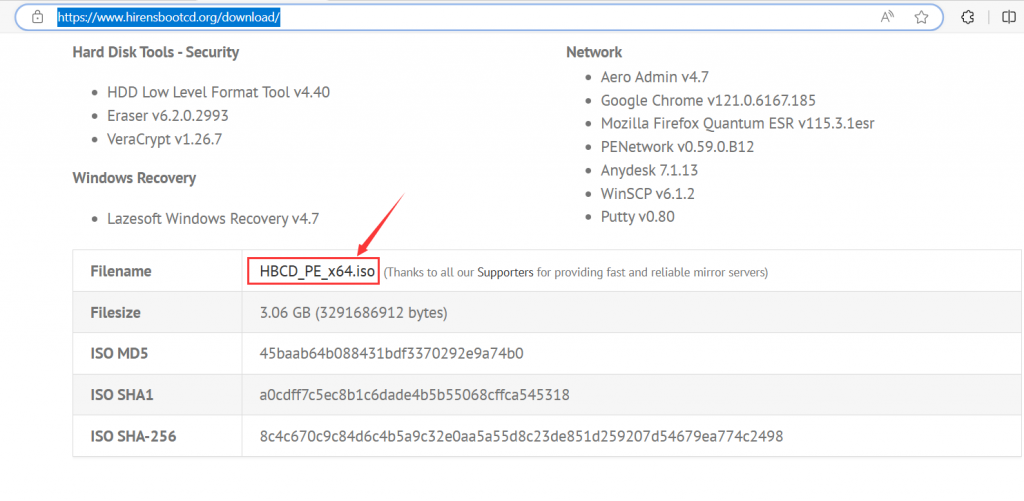
PE image file download address:Download | Hiren's BootCD PE (hirensbootcd.org)
- Make a bootable USB flash drive with Rufus:USB Booting | Hiren's BootCD PE (hirensbootcd.org
- For other operational questions, please visit HBCD-PE website: //www.hirensbootcd.org/
How to enable Secure Boot in BIOS
【05B-I7-5500U】Steps to query the hard disk in BIOS
