
K4- How to set Auto Power On
author: VENOEN
2025-09-17
Overview:
Auto-start at boot: Also known as Auto Power On, it means that as long as the industrial control motherboard or industrial control computer is turned on, the industrial control motherboard or industrial control computer can automatically turn on and enter the system to start working.
Why do industrial motherboards or industrial computers have this function?
Because industrial control motherboards or industrial control computers are usually used in unattended places, such as vending machines, express cabinets, advertising machines, production lines, processing equipment, traffic control, security monitoring, medical care, banking equipment, etc. , there is no dedicated person for maintenance and protection. Typically, a power switch is used to control a device to turn on or off. At this time, you can take advantage of the automatic startup of industrial computers. As long as the device is powered on, the industrial control motherboard or industrial control computer can automatically detect the power supply, automatically turn on and start working.
The self-starting function of industrial control motherboards or industrial computers can be roughly divided into the following two categories:
a. Special circuit board design: This type of motherboard usually has an independent 3-pin pin header, marked PWRON1. The pin header is usually equipped with a jumper by default, and is short-circuited on pin1 and pin2. When short-circuited on pin1 and pin2 pin are in the off state, and will not automatically turn on after power on. When the jumper cap is moved to pin2 and pin3, it is in the on state, and it will automatically turn on after power is supplied.
The advantage of this method: it can run stably after moving the jump cap and is not controlled by the BIOS. It is effective even if the BIOS restores the default settings or the CMOS battery is low.
a. Special circuit board design: This type of motherboard usually has an independent 3-pin pin header, marked PWRON1. The pin header is usually equipped with a jumper by default, and is short-circuited on pin1 and pin2. When short-circuited on pin1 and pin2 pin are in the off state, and will not automatically turn on after power on. When the jumper cap is moved to pin2 and pin3, it is in the on state, and it will automatically turn on after power is supplied.
The advantage of this method: it can run stably after moving the jump cap and is not controlled by the BIOS. It is effective even if the BIOS restores the default settings or the CMOS battery is low.
b. Set through BIOS (CMOS) options: Enter BIOS to modify CMOS related parameters.
The advantage of this method: no need to disassemble the machine, just enter the BIOS to modify the parameters.
The advantage of this method: no need to disassemble the machine, just enter the BIOS to modify the parameters.
Next, we will introduce the setting method of K4 model.
Applicable models:
K4-i5-4200U,i7-4500U
K4-i5-4200U,i7-4500U
1. Auto Power On setting steps
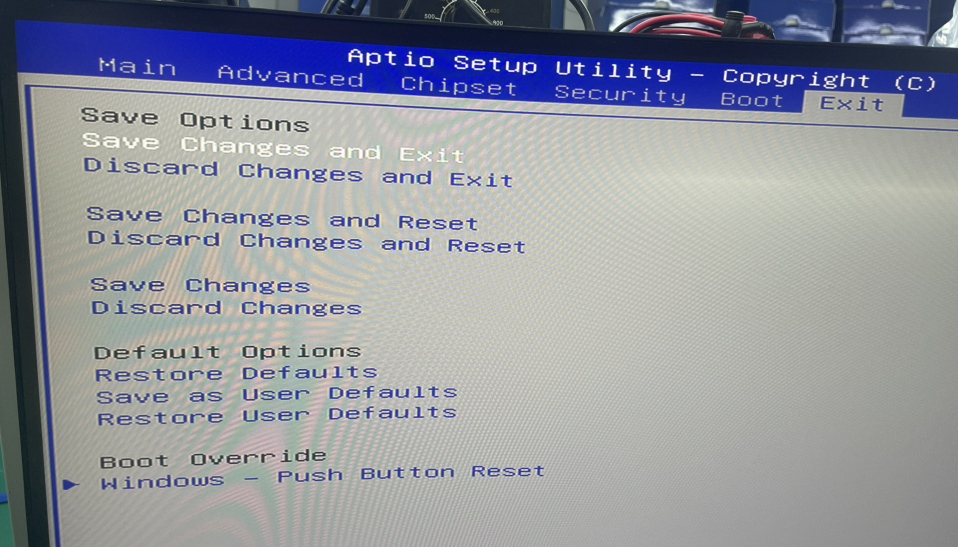
1-1. Press the PC power button and quickly tap the Delete/Del key on the keyboard to enter the BIOS Setup. Select Chipset>PCH-IO Configuration>Restore AC Power Loss and set it to Power on. After the setting is successful, press the F10 key on the keyboard to save and exit or Select Save & Exit>Save Changes and Reset.
1-1. Press the PC power button and quickly tap the Delete/Del key on the keyboard to enter the BIOS Setup. Select Chipset>PCH-IO Configuration>Restore AC Power Loss and set it to Power on. After the setting is successful, press the F10 key on the keyboard to save and exit or Select Save & Exit>Save Changes and Reset.

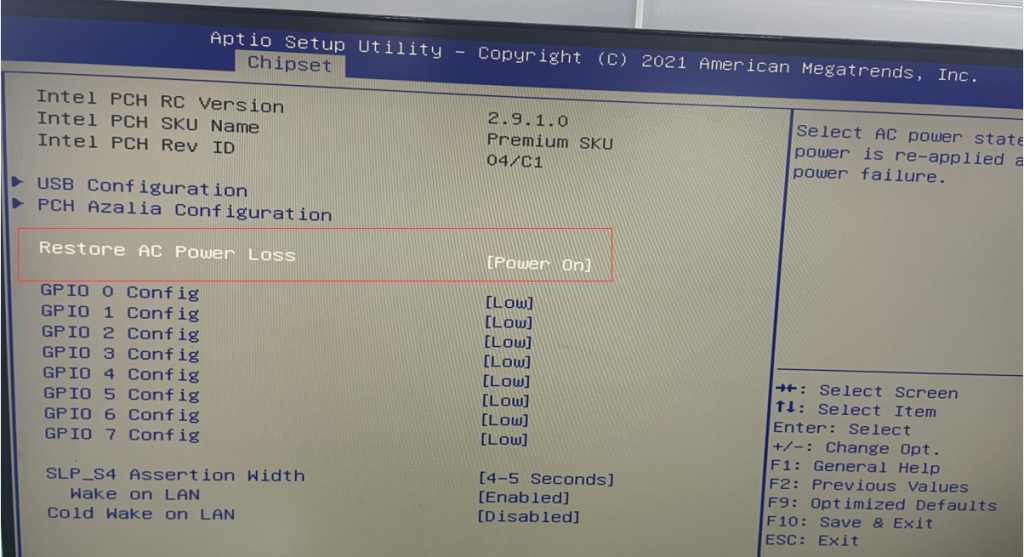
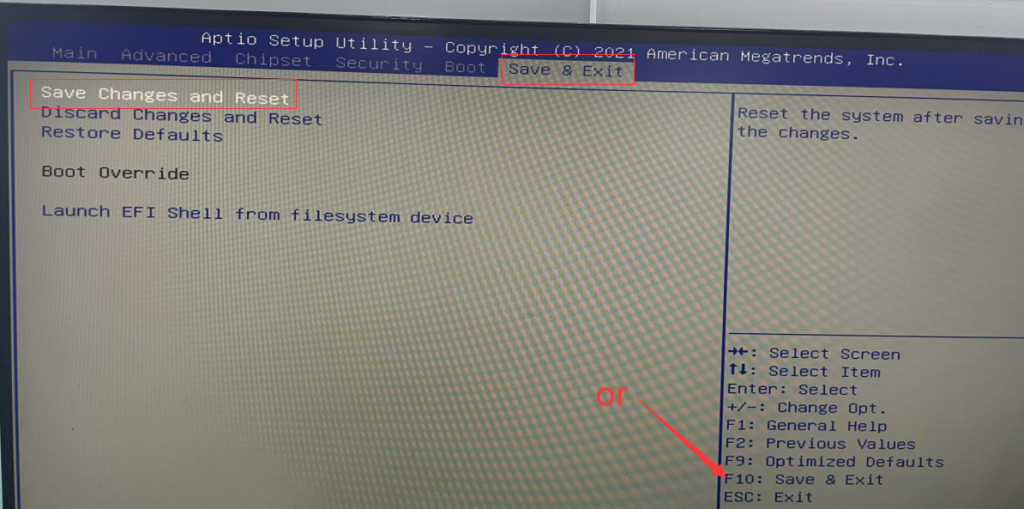
- Applicable models:
K4-J4125
1-2. Press the PC power button and quickly tap the Delete/Del key on the keyboard to enter BIOS Setup. Select Advanced>Hardware Monitor & WDT & Power on>set Restore AC Power Loss to Power on. After the setting is successful, press the F10 key on the keyboard. Save and exit or select Exit>Save Changes and Exit.
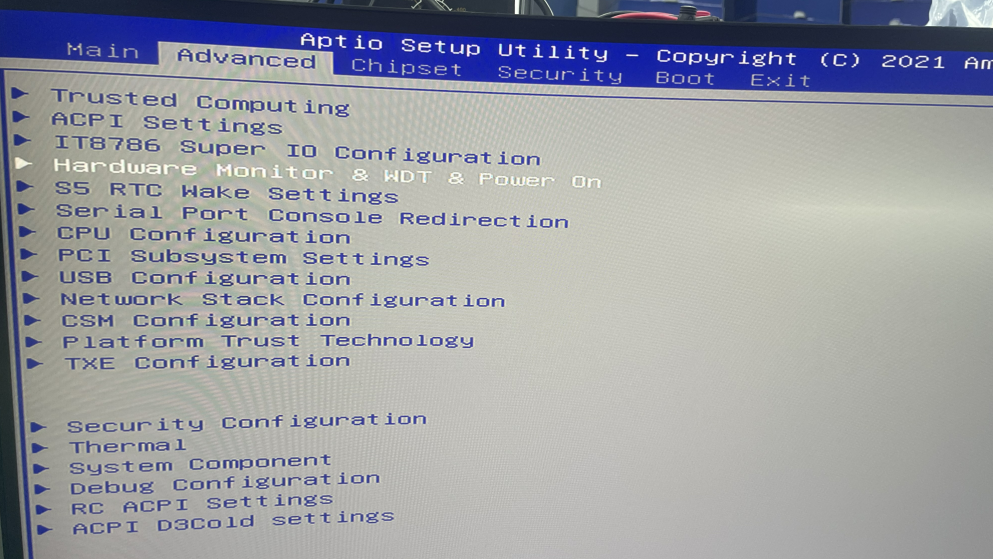
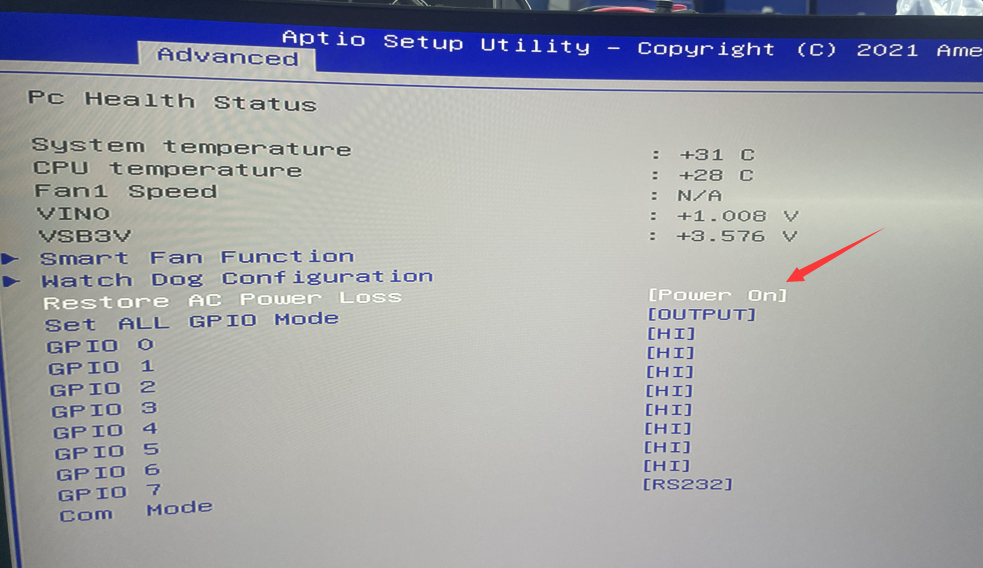
P12B How to Enable Auto Power on
H2 gen How to set Auto Power On
Related Article
